Act as a DHS Section 508 Certified Trusted Tester and WCAG accessibility specialist. Review this website, application, document, component, or workflow for WCAG 2.1 Level AA and Revised Section 508 compliance. Do not rely only on automated findings. Evaluate keyboard access, focus order, visible focus, screen reader behavior, semantic structure, headings, landmarks, forms, instructions, errors, ARIA, color contrast, non-text contrast, alt text, tables, dialogs, menus, responsive reflow, zoom behavior, mobile behavior, and complete user workflow success. For each issue, provide the WCAG criterion, Section 508 relevance, severity, user impact, steps to reproduce, expected behavior, actual behavior, recommended fix, and whether the issue requires manual verification. Include any missing information that should be requested from the site owner, developer, designer, or vendor before making a final compliance determination.
Accessibility testing and remediation guidance for WCAG and Section 508 compliance.
iD5 helps state & federal government agencies test and remediate websites, applications, and digital documents for accessibility risk, usability barriers, and compliance readiness.
Accessibility Testing That Strengthens Compliance and Usability
Our 508 Trusted Tester team is comprised of seasoned software application developers who specialize in 508 Compliance and are DHS 508 Trusted Tester Certified. We use DHS-approved
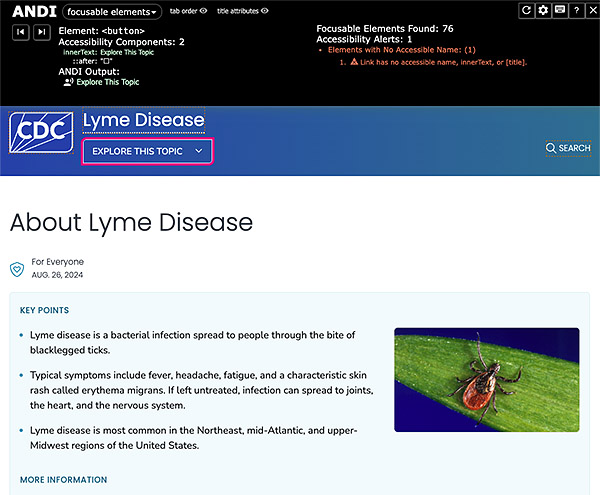
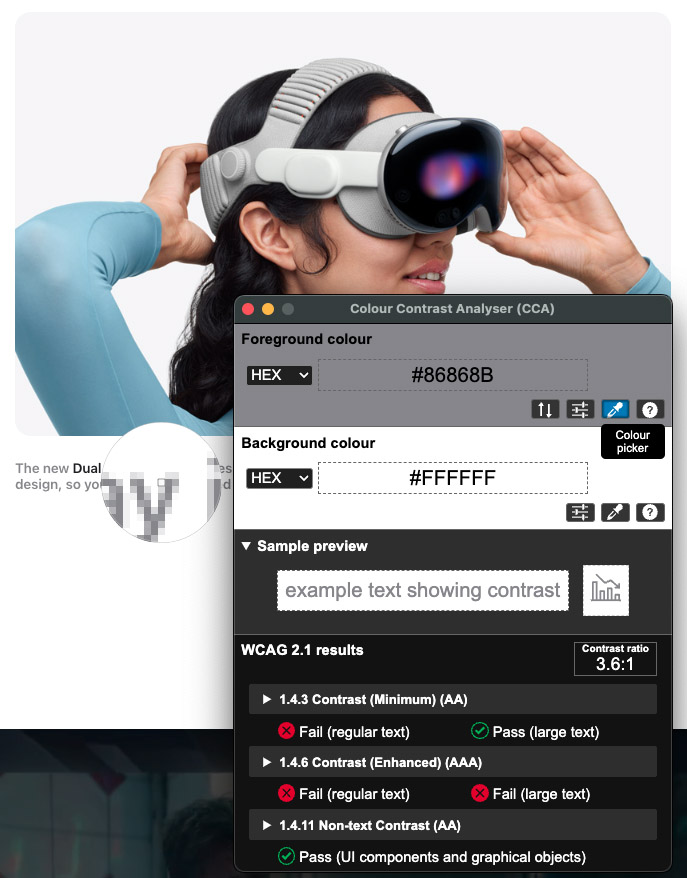
tools such as the Color Contrast Analyzer (CCA), Accessible Name & Description Inspector (ANDI), and other manual inspection techniques to perform in-depth evaluations of websites,
web applications, and digital content. Our goal is not just to help you pass an audit, we aim to enhance usability for all users while ensuring long-term accessibility compliance.
Not only do we have the expertise to identify compliance issues across your Electronic and Information Technology (EIT) websites and web applications, but we also provide clear
recommendations and guidance to resolve them quickly. Backed by decades of application development experience, a deep understanding of Section 508 accessibility standards & WCAG
guidelines, and UX-focused human-centered design, our certified testers deliver practical, working solutions that help your business or organization achieve, and maintain, 508
compliance efficiently and effectively.
AI can help identify obvious problems, but it is not a complete accessibility strategy. In real workflows, AI is most useful when it supports specific tasks and feeds results into
the next step, rather than trying to detect every issue in a single pass. Effective remediation still requires people who understand code, Section 508, and WCAG, and who can
recommend fixes that are technically sound and realistic for the team to implement. AI can support the process, but it cannot replace the expertise required to deliver a thorough,
accurate, and actionable accessibility assessment and remediation plan.
A VPAT is a document used to evaluate how accessible a product, such as software, hardware, or a web application, is according to accessibility standards, particularly the Web
Content Accessibility Guidelines (WCAG), Section 508 of the Rehabilitation Act, and the European Union’s EN 301 549 standard.
A completed VPAT results in an Accessibility Conformance Report (ACR), which summarizes how the product complies with the applicable standards and provides details on any areas that
might need improvement. VPATs & ACRs helps organizations understand how well a product meets accessibility criteria, allowing them to determine whether it is compliant with legal
accessibility requirements. Vendors or developers complete the VPAT to provide buyers or government agencies with transparency about the accessibility features and any potential
barriers in their product.
Tools: ANDI, Color Contrast Analyzer (CCA), WAVE, JAWS, & browser DevTools.
- WCAG and Section 508 audits
- Manual testing and issue documentation
- Screen-reader and keyboard testing
- Remediation recommendations and developer guidance
- Support for VPAT/ACR and accessibility planning
ChatGPT AI WCAG 2.1 and Section 508 Accessibility Testing Prompts
Use these expanded prompts for quick first-pass reviews of websites, applications, PDFs, vendor systems, and VPAT/ACR documentation. Note: AI tools do not replace manual accessibility testing, but they can help organize potential issues before a deeper expert review.
Act as a DHS Section 508 Certified Trusted Tester and WCAG accessibility specialist. Review the provided webpage, application screen, PDF, HTML, component, or workflow for accessibility issues under WCAG 2.1 Level AA, Revised Section 508, and, where helpful, WCAG 2.2 best practices. Do not rely only on automated findings. Perform a manual accessibility review that considers keyboard access, focus order, visible focus, screen reader behavior, semantic structure, headings, landmarks, forms, instructions, errors, ARIA, color contrast, non-text contrast, alt text, tables, dialogs, menus, responsive reflow, zoom, mobile behavior, and full user workflow completion. For each issue, provide the applicable WCAG success criterion, Section 508 relevance, severity, user impact, steps to reproduce, expected behavior, actual behavior, recommended fix, and suggested testing method or assistive technology check. Organize findings by severity: critical, high, medium, and low. Include both confirmed issues and likely risks that require manual verification.
Act as a DHS Section 508 Certified Trusted Tester and WCAG accessibility specialist performing a keyboard-only review. Evaluate whether every interactive element can be reached, understood, and operated without a mouse. Check tab order, Shift+Tab order, skip links, visible focus indicators, menus, dropdowns, modals, buttons, links, forms, date pickers, accordions, tabs, tables, carousels, filters, pagination, custom controls, and any dynamic content. Test expected keyboard commands including Tab, Shift+Tab, Enter, Space, Escape, and arrow keys where appropriate. Identify keyboard traps, missing or low-contrast focus indicators, illogical focus movement, hidden focus, focus loss after actions, controls that cannot be operated by keyboard, and workflows that cannot be completed. Map findings to WCAG 2.1 criteria including 2.1.1 Keyboard, 2.1.2 No Keyboard Trap, 2.4.3 Focus Order, 2.4.7 Focus Visible, and related Section 508 requirements. For each issue, provide severity, user impact, steps to reproduce, expected behavior, actual behavior, and recommended fix.
Act as a DHS Section 508 Certified Trusted Tester and WCAG accessibility specialist reviewing screen reader and assistive technology support. Using NVDA, JAWS, VoiceOver, and browser accessibility tree testing principles, review the provided screen, page, component, or code for issues affecting assistive technology users. Check whether headings, landmarks, links, buttons, form fields, tables, images, dialogs, menus, tabs, accordions, alerts, status messages, icons, custom controls, and dynamic updates expose the correct accessible name, role, state, and value. Identify where users may be confused, blocked, given incomplete information, or forced to guess context. Check for duplicate link text, vague labels, missing programmatic relationships, incorrect ARIA, decorative images announced unnecessarily, and status changes that are not announced. Map issues to WCAG 2.1 criteria including 1.1.1 Non-text Content, 1.3.1 Info and Relationships, 2.4.4 Link Purpose, 2.4.6 Headings and Labels, 3.3.2 Labels or Instructions, 4.1.2 Name, Role, Value, and 4.1.3 Status Messages. For each issue, provide severity, user impact, steps to reproduce, expected behavior, actual behavior, and recommended fix.
Act as a DHS Section 508 Certified Trusted Tester and WCAG accessibility specialist reviewing forms, errors, and workflow validation. Evaluate the provided form or form workflow for accessible labels, visible labels, programmatic labels, instructions, field grouping, legends, required field indicators, input purpose, autocomplete, validation timing, error identification, error suggestions, focus management, summary messages, inline messages, and screen reader announcements. Confirm whether users can understand what information is required, recover from mistakes, review critical submissions, and complete the form using keyboard and assistive technology. Check that errors are not communicated by color alone and that focus moves logically after validation or submission. Map findings to WCAG 2.1 criteria including 1.3.1 Info and Relationships, 1.3.5 Identify Input Purpose, 1.4.1 Use of Color, 2.4.3 Focus Order, 3.3.1 Error Identification, 3.3.2 Labels or Instructions, 3.3.3 Error Suggestion, 3.3.4 Error Prevention, and 4.1.3 Status Messages. For each issue, provide severity, user impact, steps to reproduce, expected behavior, actual behavior, and recommended fix.
Act as a DHS Section 508 Certified Trusted Tester and WCAG accessibility specialist reviewing visual design, contrast, zoom, and responsive behavior. Evaluate the provided design, screenshot, page, or CSS for accessibility barriers affecting low vision users, color-blind users, keyboard users, cognitive users, and mobile users. Check text contrast, non-text contrast, focus indicator contrast, hover and focus states, color-only meaning, font sizing, line height, spacing, readability, target size, content clipping, text resizing up to 200 percent, zoom behavior, orientation, responsive layout, and reflow at 320 CSS pixels. Identify any content that overlaps, disappears, requires two-dimensional scrolling, becomes unreadable, or loses functionality at smaller viewports. Map issues to WCAG 2.1 criteria including 1.4.1 Use of Color, 1.4.3 Contrast Minimum, 1.4.4 Resize Text, 1.4.10 Reflow, 1.4.11 Non-text Contrast, 1.4.12 Text Spacing, 2.4.7 Focus Visible, and relevant WCAG 2.2 best practices such as Focus Appearance and Target Size where appropriate. For each issue, provide severity, user impact, steps to reproduce, expected behavior, actual behavior, and recommended fix.
Act as a DHS Section 508 Certified Trusted Tester and WCAG accessibility specialist with expertise in PDF and document accessibility. Review the provided PDF, Word document, or document content for accessibility compliance under Revised Section 508 and WCAG 2.1 Level AA where applicable. Check for proper document structure, tags, logical reading order, headings, bookmarks, alt text, artifacted decorative images, table headers, meaningful links, form field labels, language settings, title metadata, tab order, color contrast, accessible lists, accessible footnotes, and correct reading structure. Identify barriers for screen reader users, keyboard users, low vision users, and users who rely on document navigation. Provide remediation guidance for Acrobat, Word, or source-document correction when appropriate. For each issue, provide the relevant WCAG criterion or Section 508 requirement, severity, user impact, steps to reproduce or verify, expected behavior, actual behavior, and recommended fix.
Act as a DHS Section 508 Certified Trusted Tester and WCAG accessibility specialist serving as an accessibility compliance gatekeeper reviewing a vendor VPAT / Accessibility Conformance Report. Evaluate the ACR for credibility, completeness, risk, and procurement readiness. Identify red flags such as vague “Supports” claims, missing testing scope, outdated product versions, missing WCAG version, lack of manual testing evidence, missing assistive technology and browser combinations, unsupported “Not Applicable” ratings, incomplete remarks, unresolved “Partially Supports” or “Does Not Support” issues, no remediation timelines, inconsistent claims across criteria, missing product limitations, and lack of evidence for complex workflows. Provide follow-up questions to send to the vendor, required evidence to request, risk level, procurement impact, and a preliminary recommendation: approve, conditionally approve, require remediation, request a revised ACR, or escalate for risk acceptance. Where possible, identify which claims require independent validation through manual testing.
Need expert accessibility support?
Build a stronger digital experience for every user with accessibility testing supporting WCAG and Section 508 standards.